Notiamo has a free plan and three paid plans. The paid plans have unlimited workspaces and people; they differ in the number of projects, video and storage.
The free plan
Every account starts on the free plan. It costs nothing and needs no card.
- 1 project, with one public address.
www.and the bare domain count as one; local addresses such aslocalhostare always allowed. After the project’s first comment, you can change the address once. - 1 workspace.
- Up to 3 people, counting your team, your clients and pending invites.
- 100 MB of files in total, and 5 MB a file.
The widget shows a small Made with Notiamo link. On the free plan, the embed code has a comment line above the script tag: keep it, the terms of the free plan require it.
Each person can have one free organization. A free organization where the widget was never installed is deleted 60 days after it opens; we email you before.
Files on the free plan
The free plan holds 100 MB of files in total (photos and documents), and each file can be up to 5 MB. Paid plans allow up to 10 MB a file and have their own storage limits (see below). Photos are made smaller in the widget before they are uploaded, so most photos take far less room than the original. On the Billing page, a free organization shows “Storage: X MB of 100 MB”.
If a free organization goes over 100 MB, uploads keep working and nothing is removed at once:
- The organization admins get an email right away, and a second one about a week later.
- About two weeks after the first email (and at least a week after the second), the oldest files are removed until the organization is back under 100 MB.
- The comments, tasks and replies stay, with their text. Each removed file leaves a note saying it was removed automatically, with the file ID. The admins get one email after a removal.
Upgrading to a paid plan, or starting the Studio trial when it is available, stops this. Organizations of former paying customers and of ended trials have 60 days before the rule applies. Removed files may be kept in backups for up to 12 months and can be brought back after an upgrade: write to support@notiamo.com. To stop abuse, uploads may also be refused.
The paid plans
| Plan | Monthly | Yearly | Projects | Video | Storage |
|---|---|---|---|---|---|
| Solo | €9 | €90 | 3 | no | fair use |
| Studio | €39 | €390 | 15 | yes | 50 GB |
| Agency | €99 | €990 | unlimited (fair use) | yes | 200 GB |
Prices are without VAT; Stripe adds the tax for your country. Yearly billing gives you two months free. You can cancel at any time. Full details on the pricing page.
Video and storage on paid plans
On Studio and Agency, and during the trial, clients and your team can add videos to comments, tasks and replies: MP4, MOV or WebM, up to 5 minutes and 500 MB each. Videos play in the dashboard, the phone app and the widget, and AI agents see them through MCP. The free plan and Solo take photos and documents.
Studio holds 50 GB of files and Agency 200 GB; the trial holds 50 GB. Solo has no set limit, within fair use. On the Billing page, Studio and Agency show “Storage: X of 50 GB used”.
- The organization admins get an email when the organization reaches 80 % of its storage, and another at 100 %.
- At 100 %, new videos and files pause until you delete files or choose a bigger plan. Clients see “This site cannot take new files right now. Contact the site owner.”
- Nothing is ever deleted from a paid organization to free up storage. Everything already stored stays.
Voice notes and AI minutes
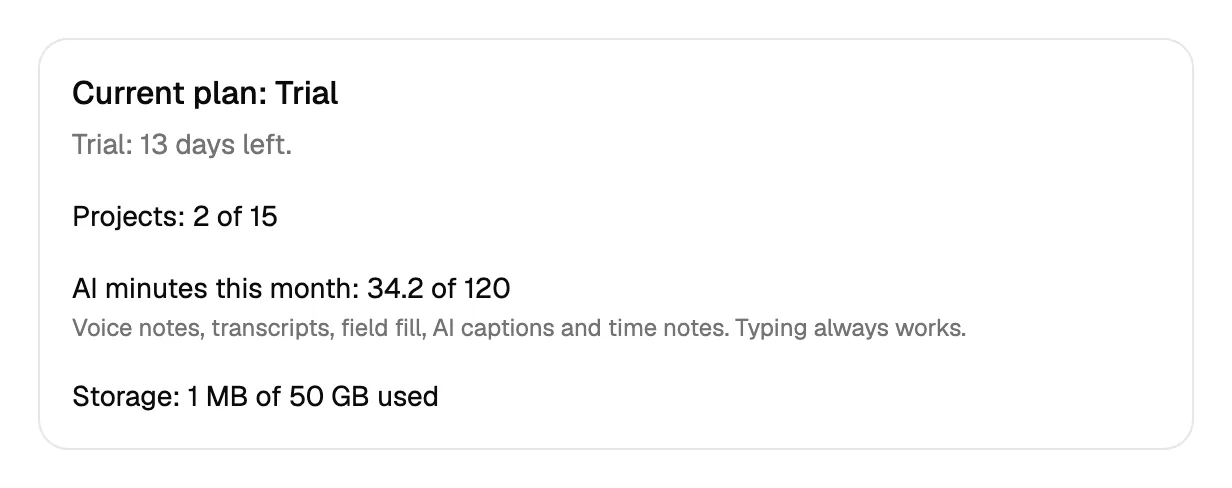
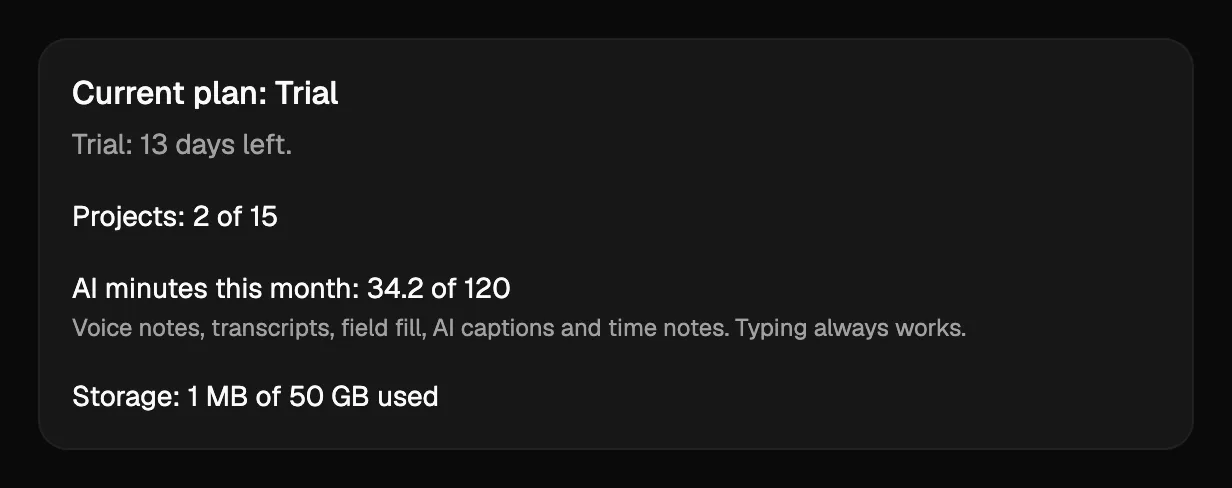
On Studio and Agency, and during the trial, clients and your team can record voice notes, and AI helps with job reports (fields from a voice note, captions for photos and videos) and writes time notes for videos (see Tasks). Each organization has voice and AI minutes per calendar month: Studio 120, Agency 500, the trial 120. The free plan and Solo do not include them.
- A voice note counts its length, rounded up to whole minutes; so does a new transcript.
- A video caption or time notes count the video’s length, rounded up to whole minutes.
- A photo caption or a field fill counts 0.1 minute.
On the Billing page, admins see “AI minutes this month: X of 120”. When the minutes are used up, recording stops until the 1st of the next month: your team sees which plan has more, clients see that voice notes can’t be used right now. Captions and time notes are skipped. Typing always works.
Try Studio free for 14 days
From the free plan, an admin can try the Studio plan once per person, in any organization.
- In the sidebar, open Billing.
- Press Try Studio for 14 days.
The trial is free for 14 days and needs a card. On day 14 the Studio plan starts and the card is charged, unless you cancel before. Each person and each card can have one trial. For 14 days you have the limits of the Studio plan: up to 15 projects, unlimited workspaces and people, video and 50 GB of storage.
Three days before the end, your team sees a banner in the dashboard and admins get an email. To stop before the first payment, cancel on the Billing page at any time during the 14 days: nothing is charged.
During a trial, some features can be smaller than on the paid plan. To prevent abuse, AI features and cloud agent runs can be off for trials; they start with your first payment.
When you cancel the trial, your free organization is back on the free plan. Nothing is deleted: your oldest project stays active, and the other projects are paused. Everyone can still read their comments, but nobody can add new ones. Choose a plan and they work again at once. Files above 100 MB follow the free plan rule after 60 days (see above).
Choose a plan
Only admins see billing.
- In the sidebar, open Billing.
- Under Choose a plan, pick Monthly or Yearly.
- Press the button of the plan, for example Choose Studio.
- Pay on the Stripe page. You come back to Notiamo; your plan updates within a few seconds.
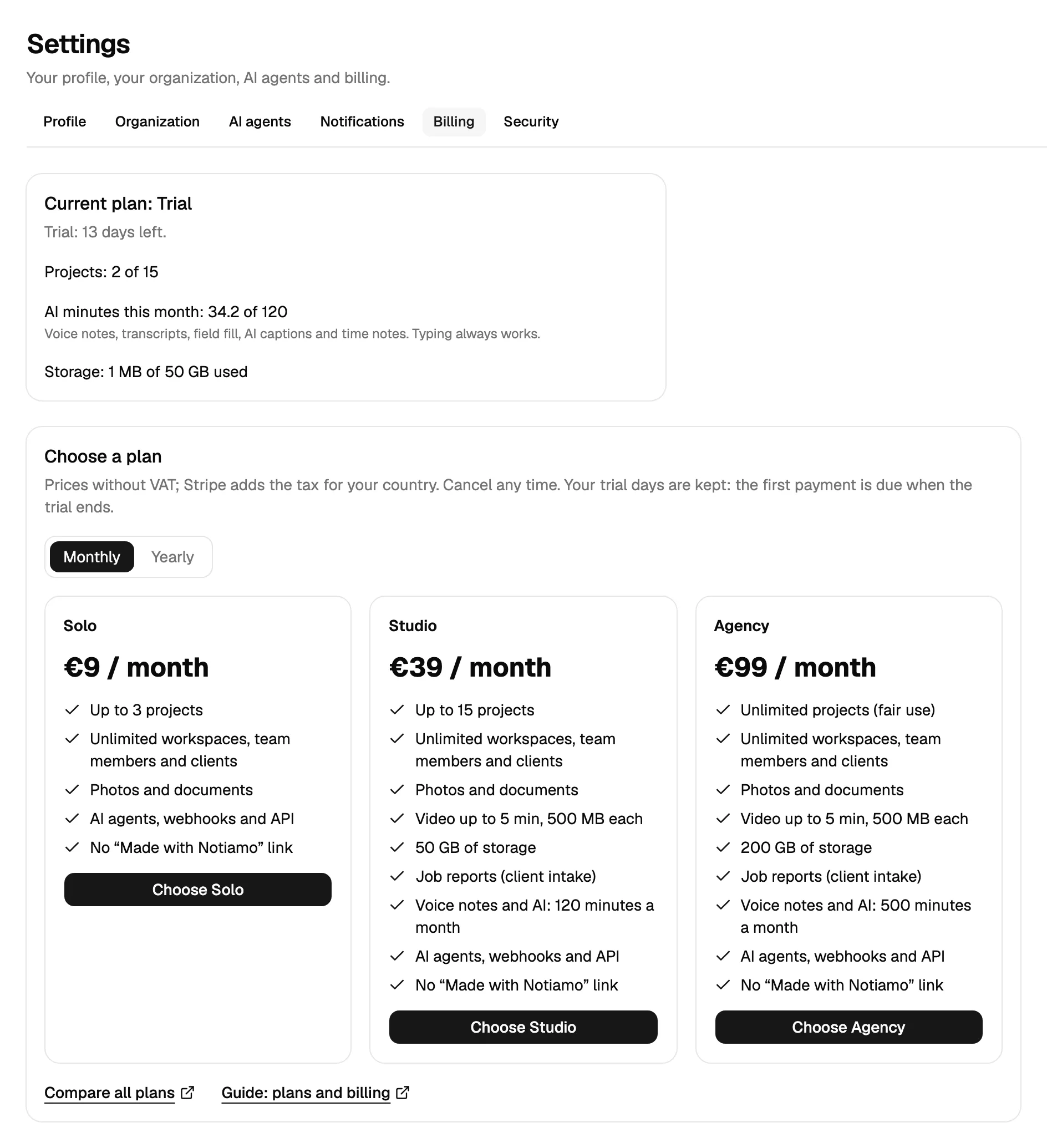
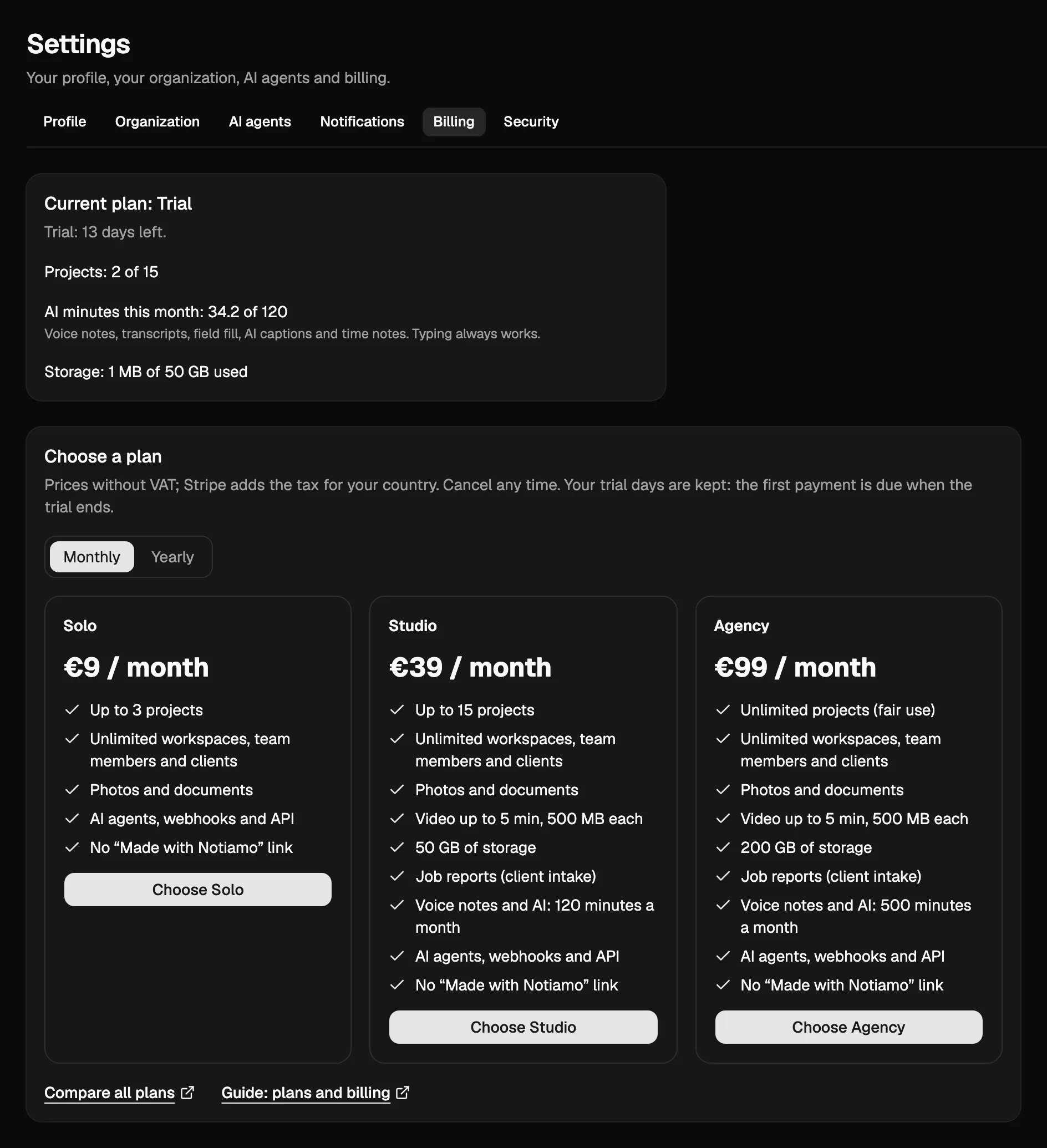
On the free plan, or when you use all the projects of your plan, a box suggests a plan. Press See plans to go to the plans. The suggested plan is marked Recommended. Compare all plans opens the pricing page.
Stripe handles the payment. Your card details never reach Notiamo.
Your AI agent can ask for an upgrade too: you get an email with a Pay with Stripe button, and you pay yourself. See Let an AI agent set up Notiamo for you.
Change plan, update your card, get invoices, cancel
On the Billing page, press Manage billing. It opens Stripe, where you can change plan, update your card, see and download invoices, or cancel.
When you pay for a plan, the Billing page still shows the plans, under Change your plan. A bigger plan has a button such as Upgrade to Studio. A smaller plan has a button such as Switch to Solo. Both buttons open Stripe. You confirm the change there.
A cancelled plan stays active until the end of the period you paid for, then your free organization is back on the free plan. Any other organization keeps all its data and needs a plan: it becomes read-only and is never deleted automatically (see More organizations below). The Current plan card shows the date.
When a payment fails
Nothing is deleted. The organization keeps working while Stripe tries the payment again. Admins see a banner with Update card.
If the payment still does not go through, the organization becomes read-only. Everyone can still read all comments, but nothing new can be added. Clients see “Comments are paused on these projects for now.” Update your card and everything works again at once.
Plan limits
When a limit of your plan is reached, Notiamo will not add another project, or on the free plan another workspace or person, and tells you which plan fits. Choose a larger plan on the Billing page, as shown above. The Billing page shows what you use.
More organizations
You can create several organizations, for example one per agency or company. Open the organization switcher in the sidebar and choose Create organization, the last item of the list. You can also open Settings › Organization: the Your organizations card lists your organizations. Press Open to go to one, or Create organization to add one.
- A new organization becomes your free organization if you hold no free organization yet. A free organization that moved to the trial or to a paid plan still holds your free place.
- Otherwise the new organization starts on the 14-day Studio trial, if you have never used the trial. There is one trial per person, in any organization.
- If you have already used the trial, the new organization needs a plan: it is read-only, with a banner, until you choose a plan on the Billing page.
- A brand-new organization that never gets a plan is deleted after 30 days. We email you 7 days before.
- A organization whose trial or paid plan ends keeps its data and needs a plan: it becomes read-only. It is never deleted automatically.
- Your free place is freed when you leave your free organization, or when it is cleaned up after 60 days without use. You can then create a new one.
Your AI agent can create a organization for you too, within a daily limit, and then ask you to pay. See Let an AI agent set up Notiamo for you.