Notiamo get free plan and three paid plans. Di paid plans get unlimited workspaces and people; dem dey different for number of projects, video and storage.
Di free plan
Every account dey start for di free plan. E no cost anything and e no need card.
- 1 project, with one public address.
www.and di bare domain count as one; local addresses likelocalhostdey allowed always. After di first comment for di project, you fit change di address one time. - 1 workspace.
- Up to 3 people, wey include your team, your clients and invites wey dey wait.
- 100 MB of files in total, and 5 MB for each file.
Di widget dey show small Made with Notiamo link. For di free plan, di embed code get one comment line above di script tag: keep am, di terms of di free plan need am.
Each person fit get one free organization. Free organization wey dem never install di widget for, dem go delete am 60 days after e open; we go email you before.
Files for di free plan
Di free plan dey hold 100 MB of files in total (photos and documents), and each file fit reach 5 MB. Paid plans allow up to 10 MB for each file and dem get dia own storage limits (see below). Di widget dey make photos smaller before dem upload, so most photos dey take far less space than di original. For di Billing page, free organization dey show “Storage: X MB of 100 MB”.
If free organization pass 100 MB, uploads go still dey work and dem no go remove anything sharp-sharp:
- Di organization admins go get email sharp-sharp, and another one about one week later.
- About two weeks after di first email (and at least one week after di second), dem go remove di oldest files until di organization go back under 100 MB.
- Di comments, tasks and replies go still dey, with dia text. Each file wey dem remove go leave note wey talk say dem remove am automatically, with di file ID. Di admins go get one email after dem remove.
If you upgrade to paid plan, or start di Studio trial when e dey available, e go stop dis one. Organizations of former paying customers and of trials wey end get 60 days before di rule start to work. Files wey dem remove fit stay for backups for up to 12 months and dem fit bring dem back after upgrade: write to support@notiamo.com. To stop abuse, dem fit also refuse uploads.
Di paid plans
| Plan | Monthly | Yearly | Projects | Video | Storage |
|---|---|---|---|---|---|
| Solo | €9 | €90 | 3 | no | fair use |
| Studio | €39 | €390 | 15 | yes | 50 GB |
| Agency | €99 | €990 | unlimited (fair use) | yes | 200 GB |
Prices no include VAT; Stripe go add di tax for your country. If you pay yearly, you go get two months free. You fit cancel any time. Full details dey for di pricing page.
Video and storage for paid plans
For Studio and Agency, and during di trial, clients and your team fit add videos to comments, tasks and replies: MP4, MOV or WebM, up to 5 minutes and 500 MB each. Videos dey play for di dashboard, di phone app and di widget, and AI agents dey see dem through MCP. Di free plan and Solo dey take photos and documents.
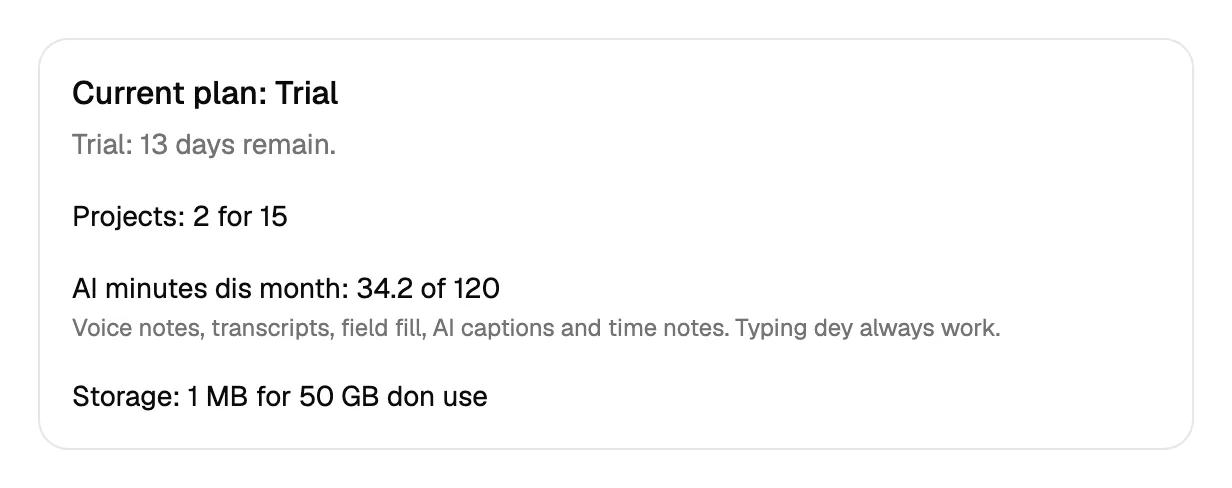
Studio dey hold 50 GB of files and Agency 200 GB; di trial dey hold 50 GB. Solo no get fixed limit, as long as e dey inside fair use. For di Billing page, Studio and Agency dey show “Storage: X of 50 GB used”.
- Di organization admins go get email when di organization reach 80 % of im storage, and another one at 100 %.
- At 100 %, new videos and files go pause until you delete files or choose bigger plan. Clients go see “This site no fit take new files now. Contact the site owner.”
- Dem no dey ever delete anything from paid organization to free space. Everything wey don dey stored go stay.
Voice notes and AI minutes
For Studio and Agency, and during di trial, clients and your team fit record voice notes, and AI dey help with job reports (fields from voice note, captions for photos and videos) and e dey write time notes for videos (see Tasks). Each organization get voice and AI minutes for each calendar month: Studio 120, Agency 500, di trial 120. Di free plan and Solo no include dem.
- Voice note dey count im length, rounded up to whole minutes; new transcript too.
- Video caption or time notes dey count di length of di video, rounded up to whole minutes.
- Photo caption or field fill dey count 0.1 minute.
For di Billing page, admins dey see “AI minutes this month: X of 120”. When di minutes finish, recording go stop until di 1st of di next month: your team go see which plan get more, clients go see say dem no fit use voice notes now. Dem go skip captions and time notes. To type dey work always.
Try Studio free for 14 days
From di free plan, admin fit try di Studio plan one time for each person, for any organization.
- For di sidebar, open Billing.
- Press Try Studio for 14 days.
You need card. For day 14 the Studio plan go start and dem go charge the card, unless you cancel before. For 14 days you go get di limits of di Studio plan: up to 15 projects, unlimited workspaces and people, video and 50 GB of storage.
Three days before e end, your team go see banner for di dashboard and admins go get email. If you choose plan during di trial, your trial days go stay: di first payment go due when di trial end.
When di trial end without plan, your free organization go go back to di free plan. Dem no delete anything: your oldest project go stay active, and di other projects go pause. Everybody fit still read dia comments, but nobody fit add new ones. Choose plan and dem go work again sharp-sharp. Files wey pass 100 MB go follow di free plan rule after 60 days (see above).
Choose a plan
Only admins dey see billing.
- For di sidebar, open Billing.
- Under Choose a plan, pick Monthly or Yearly.
- Press di button of di plan, for example Choose Studio.
- Pay for di Stripe page. You go come back to Notiamo; your plan go update within few seconds.
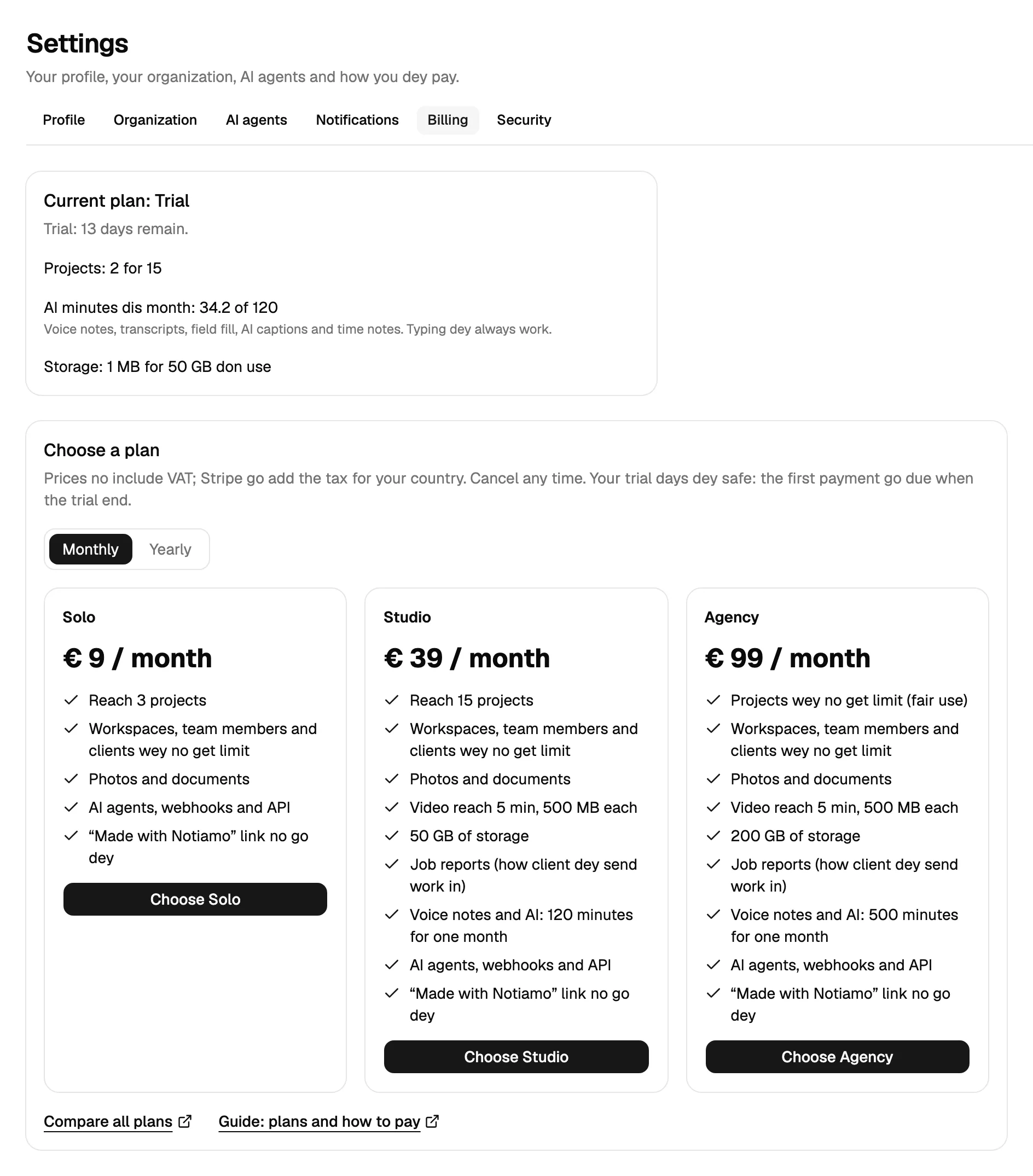
For di free plan, or when you don use all di projects of your plan, one box go suggest plan. Press See plans to go to di plans. Di plan wey dem suggest get di mark Recommended. Compare all plans dey open di pricing page.
Stripe dey handle di payment. Your card details no dey ever reach Notiamo.
Your AI agent fit ask for upgrade too: you go get email with Pay with Stripe button, and na you go pay. See Make AI agent set up Notiamo for you.
Change plan, update your card, get invoices, cancel
For di Billing page, press Manage billing. E dey open Stripe, where you fit change plan, update your card, see and download invoices, or cancel.
When you dey pay for plan, di Billing page still dey show di plans, under Change your plan. Bigger plan get button like Upgrade to Studio. Smaller plan get button like Switch to Solo. Both buttons dey open Stripe. You go confirm di change for there.
Plan wey you cancel go stay active until di end of di period wey you pay for, then your free organization go go back to di free plan. Any other organization go keep all im data and e need plan: e go become read-only and dem no go ever delete am automatically (see More organizations below). Di Current plan card dey show di date.
When payment fail
Dem no delete anything. Di organization go still dey work while Stripe dey try di payment again. Admins go see banner with Update card.
If di payment still no go through, di organization go become read-only. Everybody fit still read all comments, but nobody fit add anything new. Clients go see “Comments dey paused for these projects for now.” Update your card and everything go work again sharp-sharp.
Plan limits
When your plan limit reach, Notiamo no go add another project, or for di free plan another workspace or person, and e go tell you which plan fit. Choose bigger plan for di Billing page, as dem show above. Di Billing page dey show wetin you dey use.
More organizations
You fit create several organizations, for example one for each agency or company. Open di organization switcher for di sidebar and choose Create organization, di last item for di list. You fit also open Settings › Organization: di Your organizations card dey list your organizations. Press Open to go one, or Create organization to add one.
- A new organization becomes your free organization if you never get free organization. Free organization wey move go trial or paid plan still dey hold your free place.
- Otherwise the new organization starts on the 14-day Studio trial, if you never use di trial before. One trial dey for each person, for any organization.
- If you have already used the trial, di new organization need plan: e go be read-only, with banner, until you choose plan for di Billing page.
- A brand-new organization that never gets a plan is deleted after 30 days. We go email you 7 days before.
- An organization whose trial or paid plan ends keeps its data and e need plan: e go become read-only. Dem no dey ever delete am automatically.
- Your free place is freed when you leave your free organization, or when dem clean am up after 60 days without use. Then you fit create new one.
Your AI agent fit create organization for you too, but e get daily limit, and then e go ask you to pay. See Make AI agent set up Notiamo for you.